Subscriptions & Plans
Manage your DD Tailors subscription plan, upgrade or downgrade between tiers, and track your usage and billing. Choose the plan that fits your business size and needs.
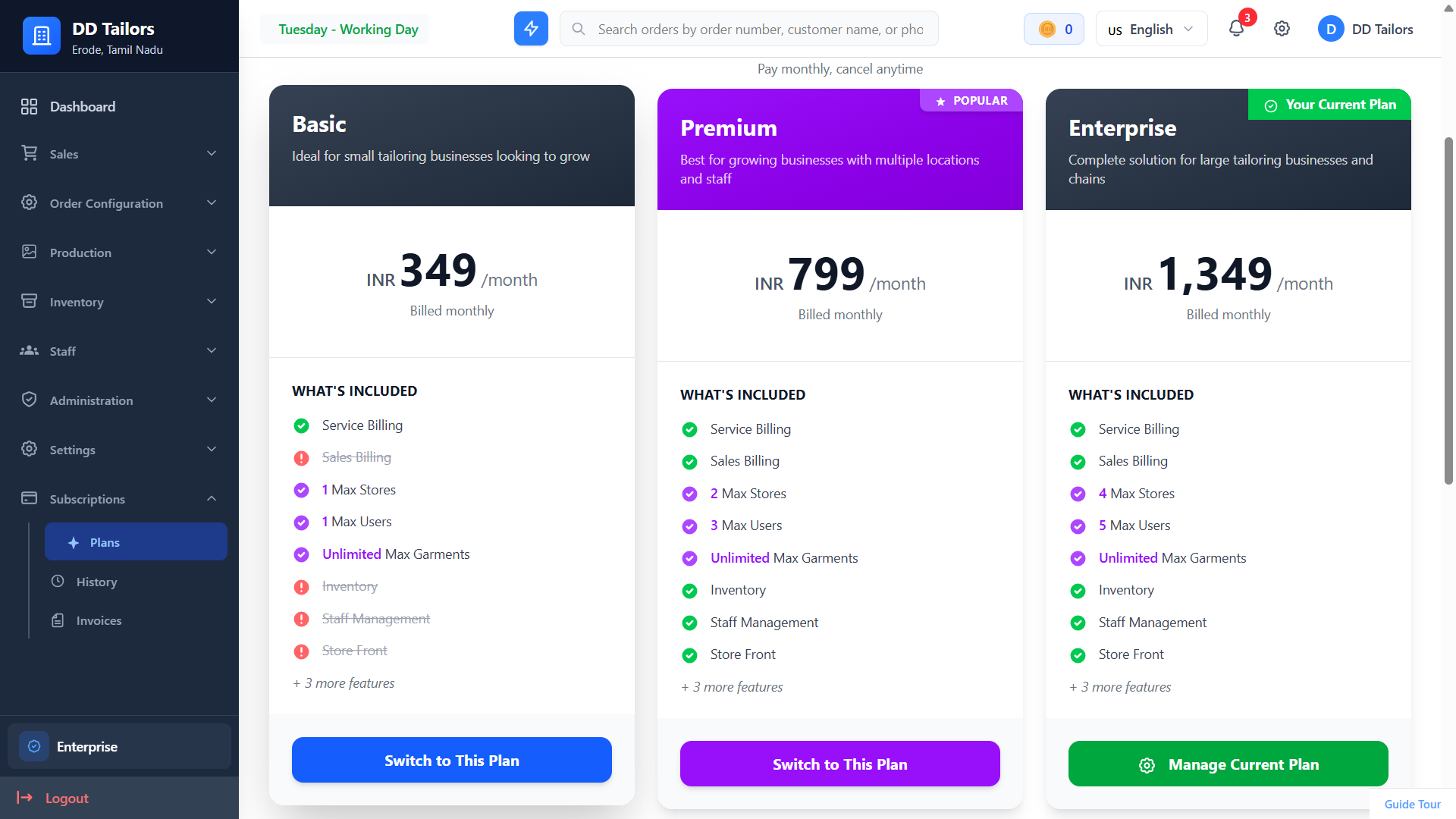
Available subscription plans and pricing
Understanding Subscription Plans
DD Tailors offers multiple subscription tiers with different feature sets and limits:
Basic Plan
Perfect for small tailoring shops just getting started.
- • Limited orders per month
- • Basic features only
- • Email support
Premium Plan
Most popular for growing tailoring businesses.
- • Unlimited orders
- • All features included
- • Priority support
Enterprise Plan
For large tailoring chains and businesses.
- • Unlimited everything
- • Advanced features
- • Dedicated support
Feature Access by Plan
Different plans unlock different features:
| Feature | Basic | Premium | Enterprise |
|---|---|---|---|
| Orders & Customers | |||
| Garments | Unlimited | Unlimited | Unlimited |
| Inventory Management | |||
| Staff Management | |||
| Advanced Reports | |||
| Store Front | |||
| Stores | 1 Store | 2 Stores | 4 Stores |
| Multi-User Access | 1 user | 3 users | 5 users |
Subscribing to a Plan
- Navigate to Settings → Subscription - View available plans
- Compare Plans - Review features and pricing for each tier
- Click "Select Plan" - Choose the plan that fits your needs
-
Choose Billing Cycle:
- Monthly - Pay month-to-month
- Yearly - Save with annual billing
- Enter Payment Information - Secure payment via Razorpay
- Complete Purchase - Your subscription is activated immediately!
New users get a free trial period to test all features before subscribing. No credit card required to start!
Upgrading Your Plan
When your business grows, upgrade to access more features:
- Go to Settings → Subscription
- Click "Upgrade Plan"
- Select the higher tier you want
- Review the prorated charge (you only pay the difference)
- Confirm upgrade - New features are available immediately!
Note: When upgrading, you're only charged for the remaining days in your current billing cycle. You won't be double-charged!
Downgrading Your Plan
If you need a smaller plan:
- Navigate to Settings → Subscription
- Click "Change Plan"
- Select the lower tier
- Review which features will be disabled
- Confirm - Downgrade takes effect at the end of your current billing period
Important: You'll retain access to your current plan features until the end of the billing cycle. Data is not lost when downgrading.
Billing & Invoices
Viewing Subscription Invoices
- Go to Settings → Subscription → Invoices
- View all past subscription payments
- Download invoices as PDF
- See payment status (Paid/Pending/Failed)
Managing Payment Method
- Navigate to Settings → Subscription → Payment Method
- Click "Update Payment Method"
- Enter new card or payment details
- Save - Future charges will use the new method
Auto-Renewal
Subscriptions automatically renew to ensure uninterrupted service:
- You'll receive a reminder email 7 days before renewal
- Payment is processed automatically on renewal date
- Invoice is emailed after successful payment
- You can disable auto-renewal anytime (service continues until end of period)
Canceling Your Subscription
If you need to cancel:
- Navigate to Settings → Subscription
- Click "Cancel Subscription"
- Select a reason for cancellation (helps us improve)
- Confirm cancellation
- Service continues until end of paid period
Alternative: DD Coins
Instead of monthly subscriptions, you can use DD Coins to unlock features on-demand:
- Purchase coin packages as needed
- Use coins to unlock premium features temporarily
- No recurring charges
See the DD Coins documentation for details.
Best Practices
✓ Choose the Right Plan from Start
Consider your expected growth when selecting a plan to avoid frequent upgrades.
✓ Keep Payment Method Updated
Ensure your payment method is valid to avoid service interruptions.
✓ Save with Annual Billing
Annual plans typically offer 15-20% savings compared to monthly billing.
Frequently Asked Questions
What happens to my data if I cancel?
Can I switch between monthly and yearly billing?
What payment methods are accepted?
What's Next?
Now that you understand the basics, explore these features: